Image to 3D MCP server. From your agent.
Connect easyrender through MCP. Give your agent a product photo, review the preview and build a textured GLB without switching to a modeling tool.
- Element
- Swivel armchair
Preview first. Credits for the 3D build.
- GLB
- USDZ
- Blender
- SketchUp
- three.js
- Shopify
- ARKit
- ARCore
The product asset your next project needs.
Work with your own photos, inside the conversation where you are already building.
Setup guides included for
- Claude
- Claude Code
- Claude Desktop
- Cursor
- VS Code
Furniture & decor
Turn a photo of a chair, lamp or decor object into a model you can inspect from every angle.
Product pages & prototypes
Building a product page in Cursor or Claude Code? Ask the agent to generate a GLB from your product photo, download it and use it in the viewer you are developing.
Repeatable asset workflows
Create a repeatable task for each product: submit its photo, review the preview, approve the cost and retrieve the model. The same renders remain available in your web library.
From an agent request to a 3D asset.
See how a photo moves through the MCP tools, then inspect a real showcase result below.
Your agent · easyrender MCP
Illustrative conversation and tool sequence. No request runs on this page.
Turn this armchair photo into a 3D model. Show me the preview and cost, then wait for my approval before building.
In this example, you instruct your agent to wait for approval. Configure that behavior in your client; the paid tool itself does not enforce a confirmation dialog.
Planning a catalogue? 24 full 3D builds = 1,536 credits.
A budget example, not a completed batch. Your agent must create and track each render separately. Extra edits and AI-client charges are additional.
create_render
Submit the product photo and request the free preview.
get_render
Poll for the preview and return its link for inspection.
get_credits
Check the balance and current full-build credit cost.
render_3d
After your approval, request the paid build. Poll get_render until ready, then retrieve the GLB link.

01Source photo
One clear image of the object. No 3D file or multi-camera capture required.
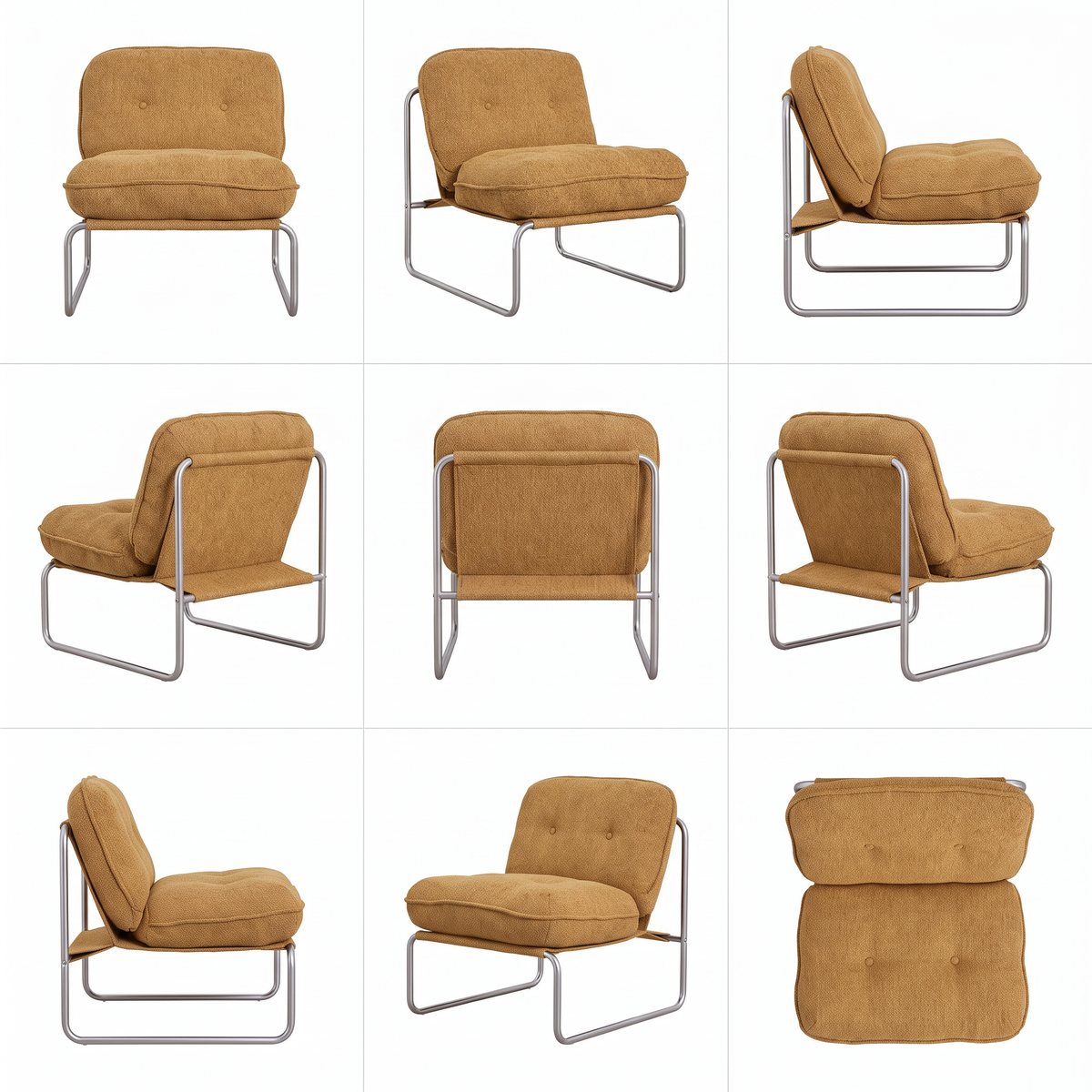
02Generated angle sheet
See how the object is interpreted from different sides before using the final asset.
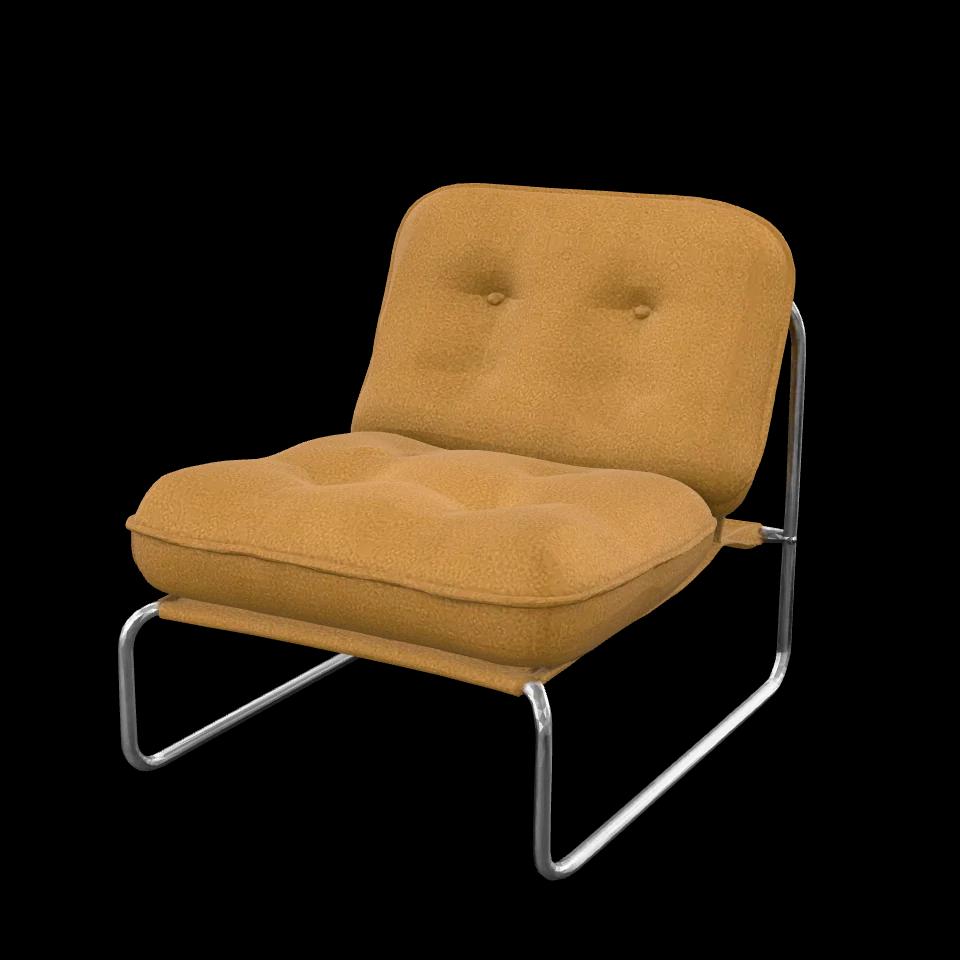
03Textured GLB
Drag to rotate the model. Download it to inspect in your own 3D viewer.
What you can inspect
These files come from an easyrender test-harness generation. The armchair materials were adjusted to match the photo and the textures compressed for the web. This is a showcase asset, not an unedited API or MCP recording.
Price and timing
The prices below are current quotes, not a receipt for this sample. This historical demo has no verified end-to-end duration; your job status and debit are the source of truth.
Pre-generated showcase assets, not a live request. This sheet is a finished example; the initial preview is watermarked. Geometry is approximate and unseen surfaces are inferred.
Download sample GLBWhat does the image to 3D MCP server cost?
Connect your agent to your easyrender account. The 3D build spends credits; there is no separate MCP access subscription.
- Angle-sheet preview
- $0.00
- No credits charged, subject to your account’s preview allowance. Review the preview before the paid build.
- Per full 3D build · pay as you go
- $0.64
- 64 credits for the final angle sheet and textured GLB. This is the full photo-to-3D workflow.
- API & MCP access
- Included
- Use your account and credits through either integration. No separate connector fee.
Budget example: 100 full builds
6,400 credits = $64.00 at the pay-as-you-go rate of $0.01 per credit. Monthly plans can lower the effective cost per credit.
Start without a subscription
The minimum credit purchase is 500 credits ($5.00). Credits do not expire. Review the total at checkout before paying.
Ask your agent to call get_credits and confirm the cost before render_3d. Your AI client or model provider may charge separately; those fees are not included here. Failed 3D builds refund their credits. Prices shown use your current currency and pricing offer.
One photo. A preview. Your GLB.
Your agent calls the tools. You choose when to spend credits.
Send a product photo
Provide a JPEG, PNG or WebP image. Your agent starts a preview and checks until it is ready.
Review before the paid build
Inspect the angle sheet. Ask your agent to check your balance and wait for your approval before calling render_3d.
Build and retrieve the model
The build runs asynchronously. Your agent checks the status, then retrieves the GLB with your authenticated connection.
Example request to your connected agent
Turn this product photo into a 3D model. Show me the preview and the credit cost first. Wait for my approval before building the GLB. Once it is ready, download the model.
Illustrative workflow. Use your own photo; the preview and model are generated when you run the tools.
Core photo-to-3D workflow
- create_render
- Start the angle-sheet preview from a photo.
- get_render
- Check progress and retrieve the result links.
- get_credits
- Read your balance and current build cost.
- render_3d
- Spend credits to build the textured GLB.
Made for individual objects. Generated geometry is approximate, without guaranteed real-world dimensions or manufacturing precision.
Give your agent a 3D tool.
Use the easyrender MCP endpoint with your account. Choose your client below for its setup instructions.
Start with your account
Sign in or create an account to manage your API keys and credits. Use the same account to find your agent’s renders in your library.
Open connectors- MCP endpoint
- https://easyrender.ai/api/mcp
Use the sign-in flow where supported, or your own API key. Keep keys in your client configuration, never in shared prompts.
Choose your MCP client
Your web app, API and MCP use the same account wallet. Paid operations use credits from that wallet; connecting or checking your balance costs no easyrender credits. Your AI client may charge separately.
- Open claude.ai → Settings → Connectors → Add custom connector.
- Paste this URL as the connector URL.
- Click Connect, sign in to easyrender and allow access. No key needed.
https://easyrender.ai/api/mcp
The same sign-in flow works with any OAuth-capable MCP client. Each connection creates a key you can revoke from Connectors.
Your first prompt
Use easyrender to check my credit balance and current operation costs. Do not generate anything or spend credits yet.
Paste this in your connected client. A successful get_credits result confirms that client can reach your account.
Give your agent the photo-to-3D workflow.
Add the easyrender skill to guide your agent from the first photo to an approved GLB build.
MCP connects the tools. The skill explains when to preview, how to check the current cost, how to work within your approved budget and how to resume a render after a timeout.
- Run the install command from your project and choose a compatible agent.
- Connect your easyrender account using the MCP setup above.
- Attach a product photo and tell your agent what to create and when it may spend credits.
npx skills add easyrenderai/easyrender.ai --skill easyrender-image-to-3dRequires Node.js/npm for the installer and an Agent Skills-compatible client. Installation adds instructions; it does not connect your account or start a render. You can also copy the skill folder from GitHub.
Try this with your photo
Use the easyrender-image-to-3d skill to turn this product photo into a GLB. Show me the preview and cost before spending any credits.
The skill is open source under the MIT license. 3D builds use your easyrender credits at the current rate shown above; your AI client may charge separately. Instructions are in English, and the agent can respond in your language.
Pay per model. Credits never expire.
Previews are free. A finished 3D model costs 64 credits ($0.64).
Free previews. No credit card required.
$0.01per credit
- From 500 credits ($5)
- GLB and USDZ downloads
- Coming soon: see it in your room from your phone
- MCP server and REST API
$49per month
- 5,500 credits every month
- About 85 3D models
- Unused credits roll over
- Need more? Top up anytime at your plan’s rate.
- Cancel anytime
Customvolume pricing
- Volume credit pricing
- Invoice billing
- Priority support
- Onboarding call
Before you connect
Do I need an easyrender account?
Yes. MCP requests are authenticated and renders belong to your account. The connector setup offers sign-in instructions for Claude and API-key configuration for the other listed clients.
Can my agent use a local photo?
create_render accepts exactly one image source: a public HTTPS URL, raw base64 data, or an upload_id from an authenticated upload. For a local photo, your client must be able to upload or encode the file. JPEG, PNG and WebP are supported. URL and upload inputs allow up to 4 MiB; inline base64 is limited to 3 MiB minus 16 KiB of decoded image data. An upload_id expires after one hour.
When are credits spent?
The angle-sheet preview is free, subject to preview limits. render_3d starts the paid build. Ask your agent to call get_credits for the current cost and to request your approval before building. That instruction is part of your agent workflow, not an extra confirmation screen enforced by the MCP server. Failed 3D builds refund their credits.
What does my agent get back?
The tools return a render ID, status and links to the render page, preview and GLB. Poll get_render until the model is ready before downloading. Private files require authentication; receiving a link does not make a render public.
Is this a model library or a CAD tool?
Neither. It generates an approximate model of the object in your photo. It does not provide a library of downloadable assets, exact measurements, manufacturing-ready geometry or automatic publication to your store.
How is MCP different from a REST API?
MCP exposes named tools that a compatible agent can discover and call in a conversation. You connect the server in your client instead of writing those tool integrations yourself. This page covers the MCP workflow.