9 min read
360 product photography or a 3D model? How to choose
360 product photography or a 3D model for your online store: how each is made, where each one plays, what it costs, common mistakes and which to pick.
On this page
360 product photography is a sequence of 20 to 80 photos shot on a turntable, which shoppers drag through. A 3D model is one file shoppers turn freely and, on a phone, place in their room. Choose 360 when the photographed surface itself sells the piece. Choose 3D when you want one file for your store, AR and marketplaces.
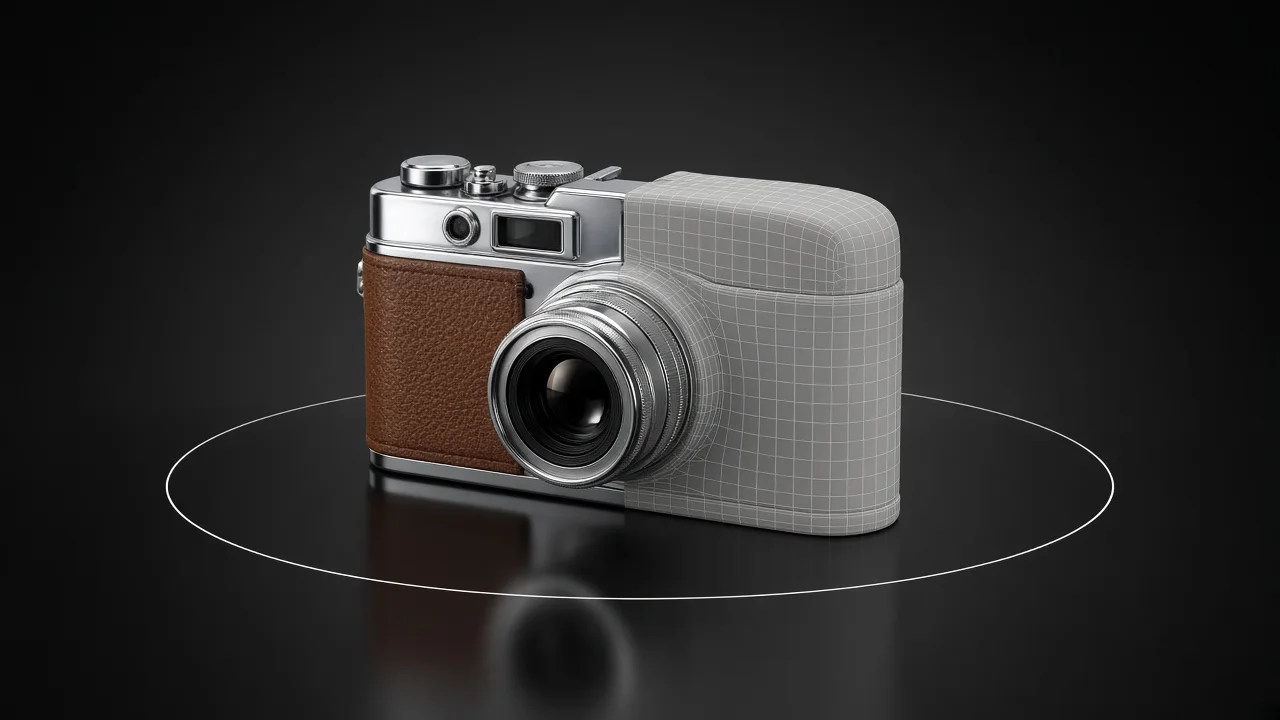
What is the difference between a 360 spin and a 3D model?
A spin is still photography. Every frame is a real photo of the real product, so the leather grain and the scratches are exactly what the camera saw. The shopper can only see the angles you shot, in the order you shot them.
A 3D model is geometry with textures on it. The shopper picks any angle, zooms anywhere, and the same file can open in AR on a phone. Shopify's help puts it plainly: with a 3D model, "the customer can view the object from any angle."
That is the whole decision in two sentences: a spin proves the surface, a model gives freedom of view.
How is 360 product photography made?
It is product photography repeated dozens of times without anything moving except the turntable. The setup in product photography for ecommerce still applies: one soft light, a plain background, exposure locked.
- Put the product on a turntable and mark its centre, so it rotates on its own axis instead of drifting across the frame.
- Fix the camera on a tripod at the product's middle height and lock exposure, focus and white balance.
- Choose a frame count. WebRotate 360 recommends 20 to 80 images per spin, the lower end for large catalogues and 72 or more for a few high-end items.
- Turn by the same step every time. Adobe's spin set guide gives the arithmetic: for 12 shots, rotate the item 30° each time.
- For views from above, shoot a second row with the camera raised. Adobe asks for at least 16 to 24 shots for a two-row set.
- Edit every frame with the same settings, then number the files in order. Sirv builds a spin from at least 8 images named with ascending numbers.
- Host the spin in a viewer and add it to the product page with that viewer's code.
Furniture makes all of this harder. A sideboard needs a turntable built for heavy pieces, a large room and even light across the whole piece for every frame.
How do you get a 3D model of the same product?
There are four routes: a 3D artist, the manufacturer's CAD files, scanning, or AI from a single photo. 3D for ecommerce compares them for a store, so we will not repeat that here.
The photo route needs only one good frame, not a turntable session. On easyrender you upload a three-quarter photo, check a free angle sheet of the piece from every side, and spend 64 credits ($0.64) only if it looks right. You download a GLB and a USDZ.
If you would rather hire someone, hiring a 3D modeler or using AI sets out what an artist costs.
Where does each one show up?
This is where most stores make the decision, because a format your platform does not show is a format you cannot use.
- Shopify. Its product media types are images, including animated GIF and WebP, uploaded videos up to 10 minutes and 1 GB, YouTube and Vimeo, and 3D models in GLB or USDZ up to 500 MB. A 360 spin is not one of them, so it needs an app or a hosted viewer.
- Amazon. In an Amazon staff post on Seller Forums, View in 3D is described as the replacement for the legacy View 360° experience, and 3D models must be GLB or glTF.
- Your own site. A spin viewer such as Sirv embeds with a div of class "Sirv". A GLB opens in web 3D viewers, and what a GLB file is covers how to check one.
Which should you choose?
Here is how the two compare on the points that usually decide it. The prices are as of November 2026.
| Criterion | 360 product photography | 3D model |
|---|---|---|
| What it is | A numbered sequence of photos | One file, GLB or USDZ |
| What you need | The product in hand, a turntable, a fixed setup | A good photo, CAD files, a scan or an artist's brief |
| What the shopper does | Drags through the angles you shot | Turns it freely, zooms, opens it in AR on a phone |
| Surface | Exactly what the camera saw | Textures on a model |
| Shopify | No native type; needs an app or hosted viewer | Native product media, GLB or USDZ |
| Amazon | Legacy View 360° replaced by View in 3D | GLB or glTF for View in 3D |
| Hosting cost example | Sirv: free plan with its logo on spins, Business from $19 a month | Your platform's product media |
| Production per SKU | A turntable session plus editing every frame | Varies by route; $0.64 per model from a photo on easyrender |
Our reading of the table: if you sell on Shopify or Amazon and you want AR, a model is the format both platforms support natively. A spin earns its place on your own site when the real surface is the selling point.
What does each one cost?
For 360, the big cost is your time per SKU. WebRotate's own advice to use fewer frames on large catalogues exists because shooting and editing cost rises with each image. A spin of 36 frames is 36 photos to clean up.
Then there is hosting. Sirv's pricing lists a free plan whose 360 player shows the Sirv logo, and a Business plan at $19 a month without it. Spin analytics are only on the paid plans.
For a model, the cost depends on the route. From one photo on easyrender it is $0.64 per model, and the preview is free, so you only pay for SKUs that look right. The credits page lists the packs.
Which goals matter, and how do you measure them?
Write down what you want the format to change before you spend on either. For most furniture and decor shops it is one of these.
- Fewer pre-sale questions. Count messages that ask about the back, the top or the inside, per product, for a month before and after.
- Engagement on the product page. Check whether shoppers actually use the viewer. Sirv's paid plans include spin analytics, and a 3D viewer on your own site can send interaction events to your analytics.
- Add-to-cart per product view. Compare a group of products that got the new format with a similar group that did not, prices and text unchanged. 3D for ecommerce describes the test.
- Page weight. Keep a spin under the 20 MB that WebRotate suggests, and open the page on a phone over mobile data.
- Production time per SKU. Log the hours from shoot to published page for each format, on the same five products.
When is 360 product photography the better choice?
When a real photo of the real unit is the argument. A one-off vintage chair with worn leather sells on its patina, and a spin shows that exact chair, flaws included. Selling vintage furniture online covers how to photograph those flaws.
It also fits when you already own a turntable studio, your products are small enough to shoot dozens a day, and you sell mainly on your own site where any viewer can run.
When is a 3D model the better choice?
When you want one file to work in several places: your Shopify store, Amazon's View in 3D and AR on phones. With easyrender, seeing it in your room from your phone is coming soon.
It also wins when the product is not in your hands. A spin needs the piece on a turntable. A model from a photo needs only the supplier's catalogue shot of, say, a bouclé lounge chair you sell but never stock. And it wins on large furniture that no turntable in your space will hold.
If you have that photo ready, upload it and check the free preview.
Can you use both?
Yes, and for some catalogues it is the best answer. Keep the photo gallery, or a spin, for the true surface, and add a model for free rotation and AR.
What we would do is start from the photos you already have. Run your best-selling pieces through the free preview, add models where they look right, and keep 360 for the few pieces whose finish is the reason people buy.
What usually goes wrong, and how do you fix it?
Most spin problems come from something moving that should not, and most model problems from the platform side.
| Symptom | Cause | Fix |
|---|---|---|
| The spin jumps between frames | Too few frames, or uneven turntable steps | Use 24 to 36 frames at equal steps |
| The product drifts across the frame as it turns | It is off the turntable's centre | Mark the centre and place the product on it |
| Brightness flickers during the spin | Auto exposure measured each frame again | Lock exposure and white balance before the first frame |
| The product page loads slowly on a phone | A long spin of full-resolution frames | Fewer frames and smaller exports, under 20 MB in total |
| The spin is not on your Shopify product page | Shopify has no 360 media type | Use a viewer app, or upload a 3D model as native product media |
| Your Amazon spin no longer shows | Amazon replaced View 360° with View in 3D | Plan for a GLB or glTF model instead |
| Shoppers never touch the model | The viewer sits far down the gallery | Put the model in the first few media slots and check interaction in your analytics |
| The studio shows up in a lacquered cabinet's spin | Reflections change as the piece turns | Diffuse the light and black out the area opposite the camera |
FAQ
It is a set of photos of one product taken as it turns on a turntable, usually 20 to 80 frames, played back in a viewer so shoppers can drag it round. Every frame is a real photo, so the surface is exactly what the camera saw. Shoppers can only see the angles that were shot.
It depends on what has to sell the piece. A 3D model lets shoppers pick any angle and opens in AR on phones, and Shopify and Amazon support it natively. A spin shows the real photographed surface. For worn leather or a one-off vintage finish, a spin can be the better proof.
WebRotate 360 recommends 20 to 80 images per spin, fewer for large catalogues and 72 or more for a few high-end items. Adobe's minimum is 8 to 12 shots for one row. Sirv needs at least 8. More frames give a smoother spin but a heavier page and more editing.
Not as a native media type. Shopify's product media covers images, including animated GIF and WebP, videos, YouTube and Vimeo, and 3D models. A spin needs a viewer app or an embed from a hosting service. A 3D model in GLB or USDZ can go straight into the product's media.
According to an Amazon staff post on Seller Forums, View in 3D is the replacement for the legacy View 360° experience, and 3D models must be GLB or glTF files. Check Amazon's current requirements in Seller Central before you commission anything, since they change.